
@BenSeawalker brilliant, that’s done the trick! Cheers!
Do like a “You pay exactly what you want” system. Everyone whom you’d like to have for free will, and everyone who’d like to pay you will.
I’m always for charging money (I believe in giving something for something; everybody benefits, no one is used) but if you want to do something for free I believe this is a great way of doing it, while still allowing people to thank you or do an exchange.
But this is the last of your concern while you’re still in development (unless the program is evolved enough, which I don’t know, I’m about to try it)
…
Meanwhile you can add a “Help-Bar” the user can slide to see a list of all the essential functions, and links to the wiki for advanced functions. (assuming you’re planning on making it a true “no-code” program, but honestly, even if you need to code in it, the layout allows for a much clearer view of what you’re building which is awesome - instead of being like a dog lost in the woods, the woods of codes)
@TheGuardian163 Welcome to Chronicler. (:
Do you mean the download link takes you to a page asking for donations? That’s feasible, but a little annoying for users. I feel the current donation link in the main post is more than sufficient. (I don’t feel like I’m being used. haha)
I like the idea of a help system. In fact, I just started a Wikia page where I can post explanations and example usage of all Chronicler’s features.
My thought is that one may hold down Ctrl and click on an item to open the relevant Wikia page, or press F1 inside text/action boxes to get help for any of the ChoiceScript actions.
@everybody_else
I’ve been thinking a lot about how to redesign the stats screen.
I believe that having 3 tabs: Stats, Local Variables, and Conditions would be the best way to provide flexibility and ease of use.
The Stats tab will consist of a section on the left that is basically a scrollable list. Each slot in the list will accept one of the three types of stat in CS. (text, percent, and opposed_pair)
the section on the right will have text boxes for the relevant info each type of stat needs.
The Local Vars tab will basically be a simpler version of the main variables tab, only consisting of variables local to the choicescript_stats page. I may even include a link to the full Variables page.
The Conditions tab (real name TBA) will be similar to the “Bubbles” screen. However, each “Scene” will instead be a custom “Stat” that can be inserted into the list in the Stats tab.
Overall, the design of the Stats tab will be to look similar to how it would be displayed in-game.
I may even consider adding a Preview tab that generates, loads, and displays a CS web page.
However, I believe that the user will have to download the CS dev tools separately and give Chronicler the location of the folder. This way, one may use the version of CS that works best for them, and I don’t have to worry about the repercussions of redistributing the CS dev tools.
What do ya’ll think? Is this the best way to go about it? Suggestions?
1 Like
Version 1.4.8 is up.
Just some minor bug fixes as can be seen in the changelog.
The only new feature is that one may press the delete key and confirm the popup, rather than right clicking.
Useful if your right mouse button doesn’t work haha
My boss took a vacation and left me to manage the IT stuff for the whole plant. On top of that, I’ve had a family reunion and a couple birthdays to attend. Real life seems to conspire against all my plans for Chronicler. XD
Anyway, I’m not going to keep apologizing for slow updates, as I’m sure its already growing tiresome.
I’m also thinking that it’s finally time I went through and cleaned up the codebase, optimizing and commenting everything. That may very well entail starting from scratch and using copy/paste for working features. If I were to do so, I’d be able to greatly boost framerate with a better rendering technique as well as implement a much better textbox system and unified GUI which would make the options menu a significantly less daunting proposition. By the same token, it would also mean a month or more of work, but would speed up future development.
As an aside, I’ve had a chance to play around with the Ren’py visual novel creator and I’m quite impressed with its power and flexibility. I am seriously considering creating a “Chronicler” tool for it as well since it is essentially a programming language like ChoiceScript.
Would any of you find this to be a useful tool? If so, I’ll work on it side by side with the rebuilt Chronicler. Just have to come up with a new name for it…
1 Like
Greetings all.
Just an update on the progress of Chronicler 2.0.
Yes, I have started a new project from scratch, and am currently in the process of setting up the framework so that Chronicler runs 10 times faster, and has a //commented codebase that doesn’t fall into the same traps that Chronicler 1.0 did.
I feel I have worked out a new coding style / naming convention that will be more practical down the line, as well as accounting for cross-platform development from the beginning.
Sadly, I don’t have the Linux or Mac modules for GM:S yet, and that is not likely to change unless they go on a 70% off sale. (or I suddenly receive a massive influx of donations) 
Chronicler 1.0 was essentially a playground for hacking together new systems. I was constantly confounded by the sheer amount of bloat this introduced and had to navigate bewildering uncommented scripts trying to figure out how on earth I had solved each problem.
Chronicler 2.0 will, hopefully, suffer significantly less from such problems.
I plan on making sure every bit of code is commented so that I don’t have to scratch my aching head when I have to modify it 6 months down the line.
I also plan on taking more time on each system, ensuring their stability, conciseness, and compatibility with each other.
Furthermore, rather than hacking together a system in Chronicler itself, I plan on having a sandbox project wherein I can test my ideas and iron them out before implementing them.
I will also finally get around to rewriting my CS parser from scratch. The one I have now is an absolute mess, and I’m sure there’s more than a couple memory leaks. I believe that in doing so, I can also fix the issue with *fake_choice’s not connecting properly.
I intend to write a weekly progress report every Thursday documenting what I’m currently working on. This will help keep me motivated to get stuff done.
Right now, I am writing my own Textbox scripts rather than using one that I found on the internet. The one I had was a ridiculous 865 lines of code, and it was run for every textbox every frame. The reason Chronicler was set to run at 500 FPS was to account for the lag this introduced, which led to typing faster than 40wpm meant that some characters you typed were skipped.
there was also a bug where text would suddenly become invisible. The text was still there, and still saved, but was impossible to edit or delete. I was never able to determine the cause of this even though I searched for several hours trying to understand his code.
I also had major difficulty with the code completion inserting text into the box. It was just far too complex for its own good.
So far I have come up with a solution that buffers all keyboard input to ensure that no matter how fast one types, all characters will be received.
I have also made it way simpler. Like 30 lines of code instead of 800.
I am also developing an improved save system that uses JSON (Java Script Object Notation) rather than serializing the data into bytes.
This means that save files can be edited by hand if something becomes corrupted, and they will be more portable if I ever choose to implement a cloud save feature.
However it may or may not increase the file size of .chron projects. I have yet to see if this is the case.
I also have an idea to (optionally) “encrypt” a .chron project so that one must provide a password to open it. The only problem with this is that Chronicler is open source, so anybody who wanted to could dig through the code, find the encryption algorithm, and reverse engineer your password. I would have to exclude that part from the uploaded source code (while providing a dummy function so it still compiles). That will make maintenance a chore, so I will not implement this feature unless someone REALLY wants it.
While I do like Chronicler’s current UI, I’m considering changing it, or, at least, the way scenes are handled. The carousel menu is kind of cool, but I feel that a series of tabs at the top of the screen would be much better for navigation. Also, developing the tab system now would help greatly with my idea for the new Stats Screen editor.
When 2.0 is released, I will also release a new version of the launcher. As it is, I don’t feel it is as aesthetically pleasing as it could be.
So, to sum things up, now is the perfect time to submit suggestions and bugs so that I can deal with them now rather than later.
Thanks for your support and encouragement! The CS community really makes all this work worth it. (:
3 Likes
Have been following and encourage you are still working on this. Will be happy to add a link over CoB once you think it is at a stage for general use.
Weekly Dev Log 1:
8/27/15
So, I appear to have greatly underestimated the difficulty of programming a multiline textbox with text wrapping.
In 14 hours, I made 3 attempts (starting from scratch each time) and each attempt ended up with its own problems. However, I’ve got one more idea to try before giving up entirely and switching to another development platform.
I must say though, the more I think about it, the better a different platform such as LibGDX sounds. LibGDX is Java, which means it can run on everything including your kitchen sink. It has built-in GUI elements such as textboxes, buttons, sliders, etc. while still providing enough freedom to draw my custom elements such as the color picker slider on bubbles.
I haven’t used LibGDX before so there will be time spent on the learning curve, and Java is one of my least favorite languages. If I had a choice, I would use C++ (or C# as a last resort). The reason being that I dislike the idea of “Garbage Collection” which is prevalent in higher level languages. Unlike C++, with Java I have (almost) no control over the lifecycle of objects, and extra processing steps are used by the system for memory management.
But, as I mentioned above, LibGDX is completely cross platform out of the box with no expensive licenses to purchase. One of those platforms is HTML5, which is something I’ve wanted to do with Chronicler from the beginning.
Having typed all that, I’ve practically convinced myself that LibGDX is the right way to go. Wasting 14 hours on “simple” GUI elements is simply unacceptable.
Side notes:
Being completely frustrated by the rather obtuse logic errors in my textbox programming endeavors, I decided to take a break and work on something far simpler: A simulation MUD with Neural Network Artificial Intelligence written in C++.
…
That was a joke.
Well, the understatement was a joke, I actually did begin development on it. You see, the final project for one of my classes next quarter will be to write a console game in C++. I’ve been a fan of MUD’s for a couple years now and couldn’t think of any other kind of text based game that I’d rather develop. I’m also greatly interested in AI development as I believe that is the way of the future.
On this endeavor, I managed to develop the Server/Client system that was able to send packets of variable length to each other. I also began work on the Neural Net AI part as I feel I have at least a basic grasp of it after all my reading. (Neural Nets are freaking awesome by the way) 
I mean, an AI that LEARNS by itself and can be adapted to ANY task? How cool is that!?
In fact, you can have a Neural Net that controls your Neural Net deciding what tasks it should learn!
Wow, that was quite a rant on things that have nothing to do with Chronicler…
Oh well. :shrug:
Rest assured that Chronicler is still at the top of my list of projects to work on.
I believe that I will switch over to using LibGDX for further development.
Tune in next week for the incredible, edge of your seat, conclusion to this dilemma!
- BenSeawalker
6 Likes
Weekly Dev Log 2:
9/3/15
LibGDX is… a less than optimal environment for Chronicler… Sure, it’s a powerful, cross-platform, graphics library for game development, but that is also its pitfall. I can’t help but feel that it’s beyond overkill for Chronicler’s needs. On top of which, it appears that the more basic GUI components are finnicky to work with, and, indeed, the web publishing aspect seems to be a massive headache to get working properly.
Also, as I stated in my last post, I really dislike working with Java.
An alternative would be to use Mono, the opensource implementation of C# that is cross platform. The awesome part is that it has plugins for Visual Studio which is my preferred dev environment over NetBeans or Eclipse. It also has a much nicer GUI than Java has ever had.
However, I’m not sure that the C# GUI is what is right for Chronicler. If I went through with this, the GUI would more than likely look somewhat like this:
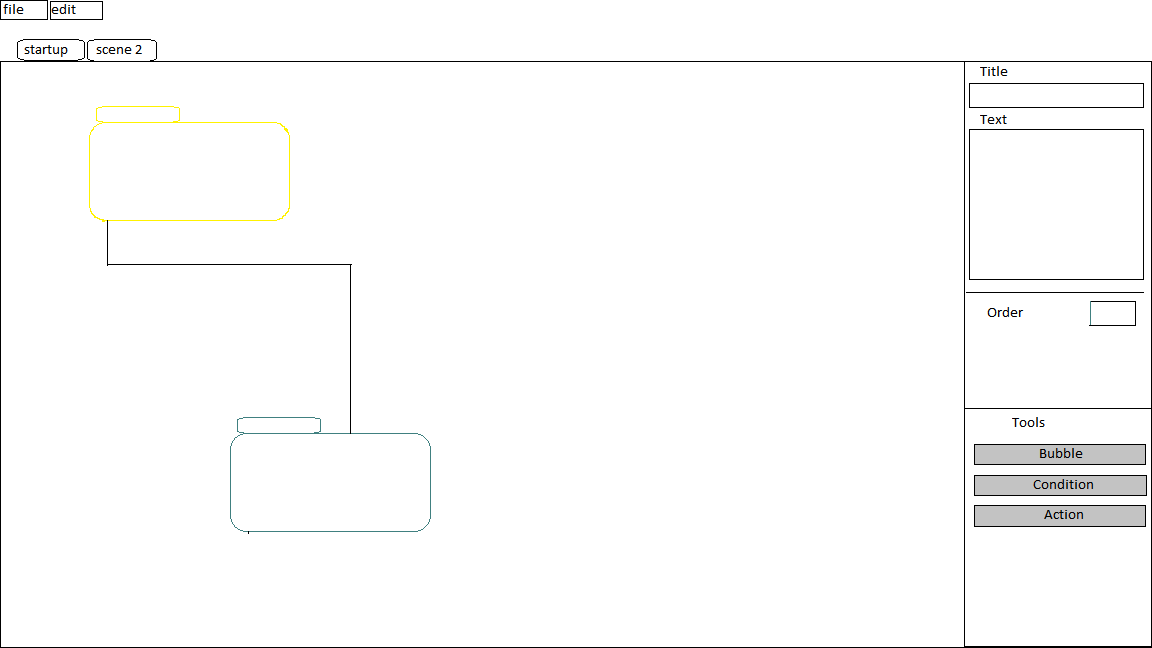
Is this acceptable? I honestly like the current Chronicler UI even if parts of it certainly need some work.
So, I leave the choice up to you my good users.
-
Continuing with Game Maker: Studio means faster prototyping with a more customizable UI and an interface that I am very comfortable with.
the con is that I must develop the UI widgets myself. -
C# or Java means a standard desktop UI with slightly better cross platform development.
however, it’s a bit more work to get it setup, and there is certainly a learning curve involved which means more time spent simply learning all the nuances of C# GUI development.
What do you think?
Let me know in the comments below.
1 Like
Personally, I prefer the white, clinical UI. It’s easier for me to think that way. But of course, other people might see it differently.
@Mirabella I worked hard on those slidey-spinny menus, dagnabit! 
Jk
Well, in the absence of further opinions, I’ve done some more research and found “wxWidgets” a graphical library that hooks into the interface of host operating system so that it looks like a native app. The best part about it is that it’s a C++ library, which I am very pleased about. C++ is, in my opinion, the best programming language available. C# has some nice features, but the extra layers of abstraction make programs run significantly slower. Not that this will be a major issue with Chronicler mind you, but it is something to take into consideration.
I’ll play around with it this week, and if it seems like a viable option, I’ll go ahead with it. If not, I’ll switch back to Game Maker: Studio. (I got the textbox to work, however, I still need to handle the selection of text via mouse dragging).
The “clinical” interface above is easily doable in GM, and I believe that I can make it an option in the options menu so that the user can decide what layout works best for them.
2 Likes
Well, almost missed my weekly update.
My internal clock is totally off after not having work on Monday due to the holiday.
So, the verdict is that I’ve decided to stick with Game Maker: Studio.
I gave up on wxWidgets due to the fact that I couldn’t ever get it installed properly in Visual Studio. However, I found QT Creator. (QT pronounced “cute”)
It is also C++ and has it’s own editor that rivals visual studio in my opinion.
I liked it a lot, however it quickly became apparent that building custom widgets is extremely confusing. I flipped through tutorials and examples, but each one had it’s own way of doing it that just felt really hacky. Attempting to design the bubbles so that they could be drug around and resized would take me just as long building my own UI in GM:S.
I haven’t totally given up on it though. My main focus will be on the GM:S version which is coming along quite nicely, however I’ll keep watching tutorials and playing around with QT. I don’t want to dismiss such a powerful platform too quickly simply because I know another one inside and out.
Onto actual development news:
I’ve built the textbox, however, there is just something I’m missing when I try and add in word wrapping. It’s purely a logic error on my part, but one that I’ve been beating my head against the wall with. For some reason it makes the cursor all wonky. Like, I can get it to work with word wrapping, but it breaks when the user hits the enter key, or I can take out the word wrapping and it works with the enter key.
I feel that I just need to abandon my current process (which I’ve tried to make as simple as possible) in favor of a slightly more complex approach that I literally had a dream about last night. haha
(yes, I have programming nightmares quite frequently when I hit a wall in development)
Well, challenges such as these will only strengthen my abilities for the future, and that’s a win in my book.
Seawalker: OUT
1 Like
Weekly Dev Log 4:
9/17/15
Qt is proving to be both a sense of wonder and baffling mystery to me. One moment I feel I have it figured out, and the next, I know nothing at all. The community seems helpful, but specific examples (for the things I need to do) are sparse. Even perusing similar questions on StackOverflow and the Qt forums usually results in non-verbose answers that make little sense to a newbie like me.
I’ve spent most of the day today simply trying to add a “New Scene” button to the scenes QTabWidget similar to the “New Tab” button in Chrome or Firefox.
I can’t simply add the QTabBar and a button into a layout as the QTabBar doesn’t update its width to reflect the size of the tabs it contains. In other words, the button sits in one place on top of the first tab. I tried manually setting the position of the button by summing up the widths of each tab, but for some reason the “width” member variable of each tab doesn’t seem to contain the right value, and thus makes the coordinates of the button either too far or too close. (It’s random each time I start the program ???)
I really want Qt to work, but it’s proving more of a hassle than it should.
The Save System
I got to thinking today as well about ways to import .chron projects into whatever format I choose for Qt. As it stands, all Chronicler projects use GM:S’s built-in encryption for data structures such as ds_maps and ds_lists which are what I use. I would have to write a small program in GM:S that converts that data into JSON format or similar, then have users run it on their projects to update them to the new format. (if I decide to continue using Qt)
Otherwise, the process could be built-in to Chronicler 2.0 if I use GM:S.
Conclusions
I could easily make my own Tab View in GM:S that has all the functionality I need in less than a day, rather than wasting so much time figuring out what should be simple things in Qt.
I also am still having trouble with my implementation of a text box. There is no source code for such a thing in any language that I could find and adapt on the internet. Basically all the answers to similar questions were “Why do you want to make your own text box?” and “It’s really hard, just use a built-in one” and similar extremely unhelpful suggestions.
If only GM:S had one, but if wishes were fishes there wouldn’t be enough room in the sea.
Basically, I can get the textbox to work without text wrapping, or I can go back to the inefficient one that I’ve been using until now. This is the only thing hanging up the new version of Chronicler via GM:S. (The text wrapping works, however it screws up the positioning of the cursor in the text, leading to unwanted results.)
As much as I hate to admit it, GM:S still seems like my only viable option. Chronicler requires far more functionality than some simple GUI app that Qt and other libraries seem suited for. Not that Chronicler couldn’t be achieved in Qt, it would just take a lot more time than I have to spend.
1 Like
Have you seen this? http://gmc.yoyogames.com/index.php?showtopic=592186
@CJW Yes, that was the script I was using before. It is apparently a newer version of the one I was using before, but looking at the code, I can see little difference.
It works well, but takes a significant chunk of processing time. I worked my way around that by writing a simple text display script for when the user wasn’t specifically editing one of the textboxes. Implementing code completion in it was a hassle as well, and the method I ended up using felt hacky.
It would be nice if he had commented the code so that I could at least get a vague idea of the process, but as it is he uses seemingly random variable names like “i” (not as a loop counter) and “a” throughout the script which makes it non-self-documenting.
I really appreciate his work. It is an excellent textbox, but it doesn’t suit my needs as well as I would like. However, I am willing to make another attempt at reading through it and figuring it out.
Thanks for the suggestion!
Man, I feel you about the textbox issue. I’ve been trying to hack together one for my own use in Studio, and it’s a bloody nightmare, and mine is only a single line, non-selectable version! It really is an enormous hassle for such a seemingly basic thing.
If you ever need a hand coding anything let me know, I have a bachelors in computer science and mainly work with databases and .net at the moment. So I don’t mind chances to stretch my non sql coding muscles. Plus I really like the choice community and the works it puts out and would love to help work on a project that makes it easier for people. Just figured I would throw this out there. Also Java isn’t so bad is it 
1 Like
@stainedofmind
Here ya go, mate (:
It’s not perfect, but it should get you started
I made the example easily extensible, if you want to create more UI widgets, just create a new object and set objUIItem as the parent.
The text selection seems to be working, but you’ll need to write the actual highlighting yourself. I put a place to do so in the draw event of objUILineEdit. (It’s commented, so you should find it with no trouble)
objUIItem also has “overridable methods” in the event_user0 event that you can copy/paste into the event_user0 event of your widget. (See objLineEdit for the example)
EDIT: the highlight drawing code looks like this:
        //////////////
        //  DRAW CURSOR
        ////
            // blink on and off every 15 frames
            if(cursor_blink++ mod 30 <= 15)
            {
                var cx = x + string_width(string_copy( text, 1, cursor_pos));

                draw_line( cx, y, cx, (y + string_height("W")) );
            }

            if(text_select)
            {
                var x1 = x + string_width(string_copy( text, 1, min( cursor_select_start, cursor_select_end ) )),
                    x2 = x + string_width(string_copy( text, 1, max( cursor_select_start, cursor_select_end ) ));

                draw_rectangle_colour( x1, y, x2, (y + string_height("W")), c_blue, c_blue, c_blue, c_blue, false );
            }
I’m in the process of getting my bachelors of software engineering at the moment, only a year and a half to go! (I hate the general ed stuff they make you do, I could have been done way before now)
If you want to help, then by all means, go ahead and download the example above, and see if you can extend the objUILineEdit into a multiline objUITextBox. I need it to work with that example as it is the format I’m using for the rest of my widgets.
Here’s my somewhat messy version that I’m playing around with, some of the scripts might help:
Java isn’t terrible… But I’d rather avoid it if possible. haha
Thanks for the offer!
Hey, thanks for sharing your code. Unfortunately, I can’t really adapt it to work with what I currently have. Our methods are just too different. I’m going to be redoing my “widget” system from scratch soon to make it more modular and scalable, but the current version I have is done all in scripts and data structures, independent of instances. I did, however, take away from your code the idea of simulating “events”, like “mouse enter” and such. I’m definitely going to be adding this idea into my next version.
1 Like
@stainedofmind Awesome (:
I used to do everything with data structures because of the potential memory/processing savings, but objects usually result in less complex code and easier debugging. More power to you if you can get it working though!
Go ahead and use the “user_input” / “update_user_input()” script and variable for text input. It doesn’t have any of the problems that keyboard_string has. There is no text limit, and backspace/delete work as expected. So does the Enter key, it inserts a chr(10) (newline) character rather than a #. Speaking of which, it also allows the user to type #'s in their strings.
to use it, when a widget is activated:
keyboard_string = "";
user_input = ui_item.text;
and in the step event:
// cursor_pos = index in user_input to insert newly typed text
// it is an optional parameter, leave blank to simply append text
update_user_input(cursor_pos);
ui_item.text = user_input;
also make sure to declare user_input as a globalvar in your control object.
Good Luck!
Weekly Dev Log 5:
9/24/15
I have the textbox working now!
The problem was in my word wrapping script. It kept the user-typed newline characters in the wrapped string which was throwing off my calculations. I should have seen it sooner, but I looked everywhere else first. >_<
In any case, now that the cursor movement feels natural, I just need to finish up the text selection. It already works with mouse input, I just need to add the keyboard controls.
I also need to add a scrolling mechanic which shouldn’t be too hard.
On a side note: I found that game maker had a builtin script for text wrapping. However, it only draws the text to the screen, it doesn’t return the wrapped text, which is what I need for calculating the correct position to draw the cursor on the screen. I also found a bug with it where it doesn’t correctly measure the width of multiple spaces. Holding down spacebar would let you type outside the bounds of the box you specified for it. I plan on filing a bug report with YoYo,
Now that that headache is relatively out of the way, I can get back to the parts that make Chronicler Chronicler.
the general vote seemed to be that the users wanted a sidebar for properties when a bubble is clicked on. Similar to Unity3D’s editor.
My question is: Do you still want to be able to edit bubbles directly by clicking on them? (Like it is now)
Or should I remove that entirely?
I feel that I should implement both, and add it as an option in the options menu.
As for the new bubbles, I’m thinking that making them into groupable sections that one could minimize or expand would be a nice feature.
For example: in the Choice of Dragon example, the section of the story where you battle the knight could be made into a group. The group will act like a huge bubble which you can shrink (giving it a label and description box similar to text bubbles). Of course, any choices that branch out from bubbles within the group will still be represented when the group is shrunk.
Another suggestion was that users should have more keyboard shortcuts to work with. I fully agree with this, and now that I’m writing my own GUI widgets, I believe that this can be implemented efficiently. I would like to make it so that one could work almost entirely without having to touch their mouse.
3 Likes