\
**Category:** ChoiceScript Help\
**Created:** [November 29, 2023, 12:32am UTC](https://forum.choiceofgames.com/t/missing-export-to-html/145496 "2023-11-29T00:32:43Z")\
**Posts on this page:** 6\
**Page:** 1
**Author:**  [@MoonlightBomber](https://forum.choiceofgames.com/u/MoonlightBomber)\
**Post date:** [November 29, 2023, 12:32am UTC](https://forum.choiceofgames.com/t/missing-export-to-html/145496/1 "2023-11-29T00:32:43Z")
I’m thrilled that I can use checkpoints without much hassle, but I have two concerns.
1. When I run the game via the server, I don’t see the “Export to HTML” option.
2. The image display problem still persists even after upgrading CS versions, and when I try to display them, the game fails the Quicktest. Surprisingly, though, the images display as normal when running the game from the server.
---
**Author:**  [@S\_Missions](https://forum.choiceofgames.com/u/S_Missions)\
**Post date:** [November 29, 2023, 12:52am UTC](https://forum.choiceofgames.com/t/missing-export-to-html/145496/2 "2023-11-29T00:52:13Z")
Check to see if you have an “IFID” for Export to HTML
> **[Important ChoiceScript Commands and Techniques](https://www.choiceofgames.com/make-your-own-games/important-choicescript-commands-and-techniques/)**
>
> A guide of important techniques in the ChoiceScript programming language. Please post on the ChoiceScript forum if you have questions about this document. Don’t Start Here! Be sure to read ou…
---
**Author:**  [@dfabulich](https://forum.choiceofgames.com/u/dfabulich)\
**Post date:** [November 29, 2023, 12:52am UTC](https://forum.choiceofgames.com/t/missing-export-to-html/145496/3 "2023-11-29T00:52:26Z")
I wasn’t able to reproduce either of those problems.
First, make sure you’ve downloaded the latest version of ChoiceScript from Github. [https://github.com/dfabulich/choicescript/archive/refs/heads/main.zip](https://github.com/dfabulich/choicescript/archive/refs/heads/main.zip)
- I created an image called `test.png`
- I put the image in the `web/mygame` folder in my ChoiceScript download (NOT the scenes folder)
- I edited `startup.txt` and added a line `*image test.png` after all the `*create` commands.
- I ran the server, which opened a browser window, and my image appeared in the game.
- I could see the “Export to HTML” link there, as well as the “Quicktest” link. I clicked the “Quicktest” link to run Quicktest, which passed.
Is that not working for you? If not…
1. Can you include a screenshot of the missing Export to HTML option?
2. Can you provide steps to reproduce the image display problem?
---
**Author:**  [@MoonlightBomber](https://forum.choiceofgames.com/u/MoonlightBomber)\
**Post date:** [November 29, 2023, 1:53am UTC](https://forum.choiceofgames.com/t/missing-export-to-html/145496/4 "2023-11-29T01:53:39Z")
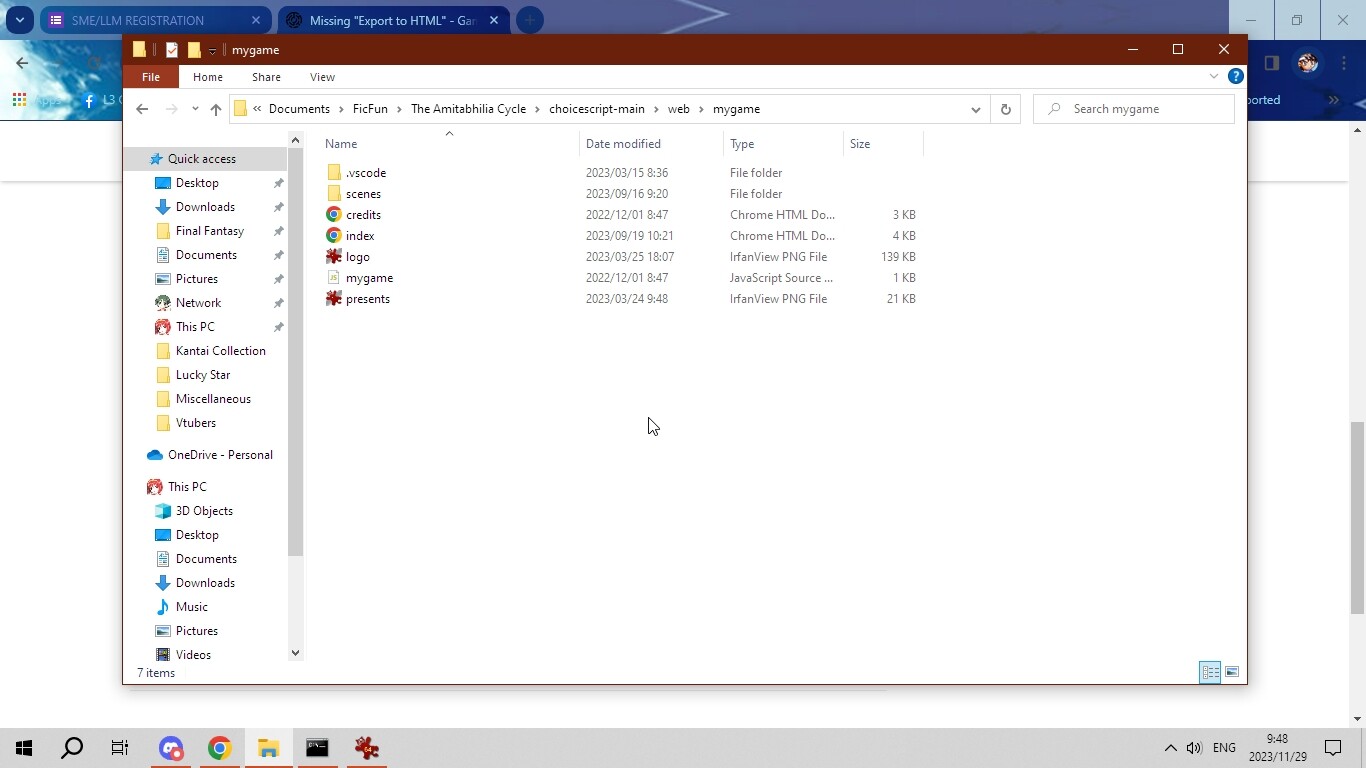
OK, I’ve done the steps you took, and the problem still persists. I don’t see the “Export to HTML” option, and thus I’m forced to use the compile.html file to make up for it. As for the images, the HTML file I generated using compile.html misses the images, unless the images are placed in the same folder as the HTML file. And to help you track down the problem, I’ve included three screenshots, with the third one being the contents of my game.


---
**Author:**  [@dfabulich](https://forum.choiceofgames.com/u/dfabulich)\
**Post date:** [November 29, 2023, 3:33am UTC](https://forum.choiceofgames.com/t/missing-export-to-html/145496/5 "2023-11-29T03:33:03Z")
See where it says that your `index` file (which is really named `index.html` under the hood) was last modified in September? It looks like you’re not using the latest version of ChoiceScript. The latest version of ChoiceScript modified the `index.html` file in November.
Upgrading ChoiceScript is annoying when you have images, because you have to copy over your `scenes` folder, but also preserve any images that you have in your `mygame` folder, but _not_ copy over the old versions of the `index.html` file or the `mygame.js` file.
But I believe if you do all that, you’ll at least get the Export, Quicktest, and Randomtest links to show up.
> [@MoonlightBomber](#):
>
> As for the images, the HTML file I generated using compile.html misses the images, unless the images are placed in the same folder as the HTML file.
Yes, that is a separate, known bug in the exporter/compiler. I hope to get around to fixing that soon…
---
**Author:**  [@system](https://forum.choiceofgames.com/u/system)\
**Post date:** [November 30, 2023, 3:34am UTC](https://forum.choiceofgames.com/t/missing-export-to-html/145496/6 "2023-11-30T03:34:01Z")
Closed on November 30, 2023, 3:34am UTC
This topic was automatically closed 24 hours after the last reply. If you want to reopen your WiP, contact the moderators.